
Wrenchie
Designing a Focused CRM for Auto Repair Shops
Problem
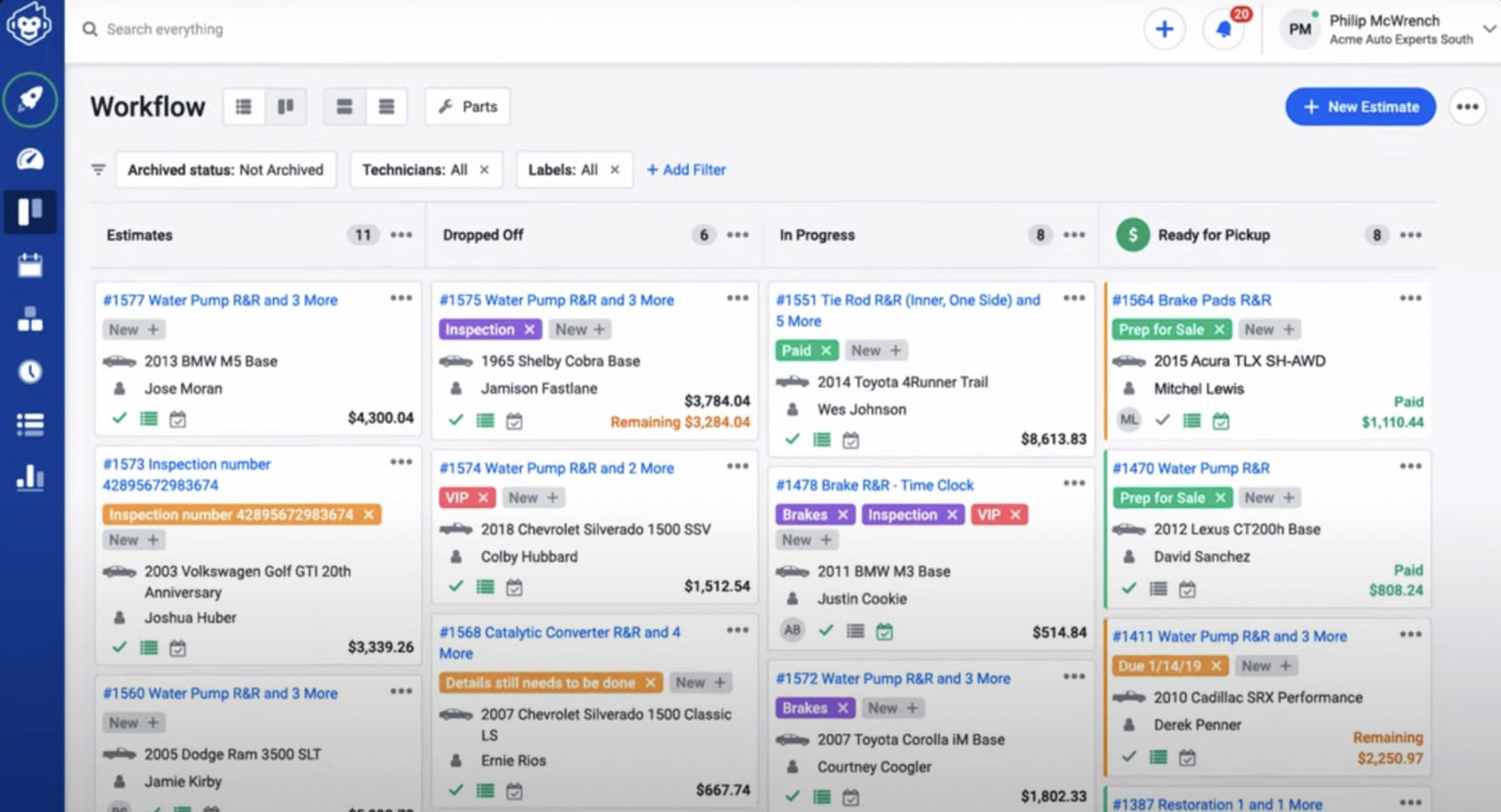
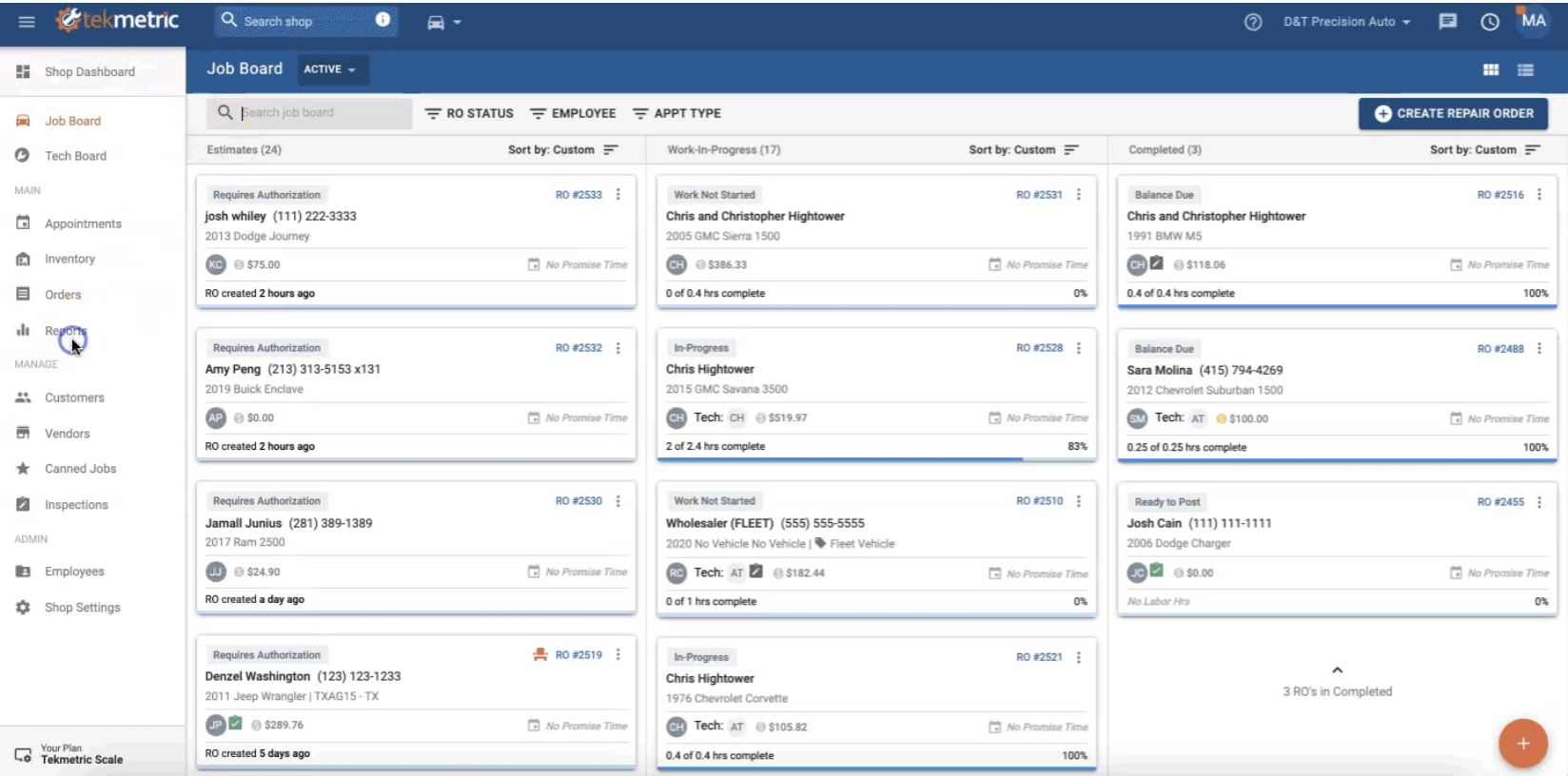
Small and mid-sized auto repair shops struggle to efficiently manage repair orders because existing CRM platforms are overloaded with features and expensive, leading to low adoption and slow workflows. During research, tools like Tekmetric and Shopmonkey revealed consistent issues: overwhelming dashboards with 15+ competing elements, long onboarding times (~60–120 minutes), critical workflows buried under layers of UI, and features that exist but are rarely used or even discovered. The core failure: The first interaction creates friction, discouraging users before value is realized. For service writers—who are responsible for managing jobs and customers—this directly impacts speed, accuracy, and daily operations.
The Competition
The Solution
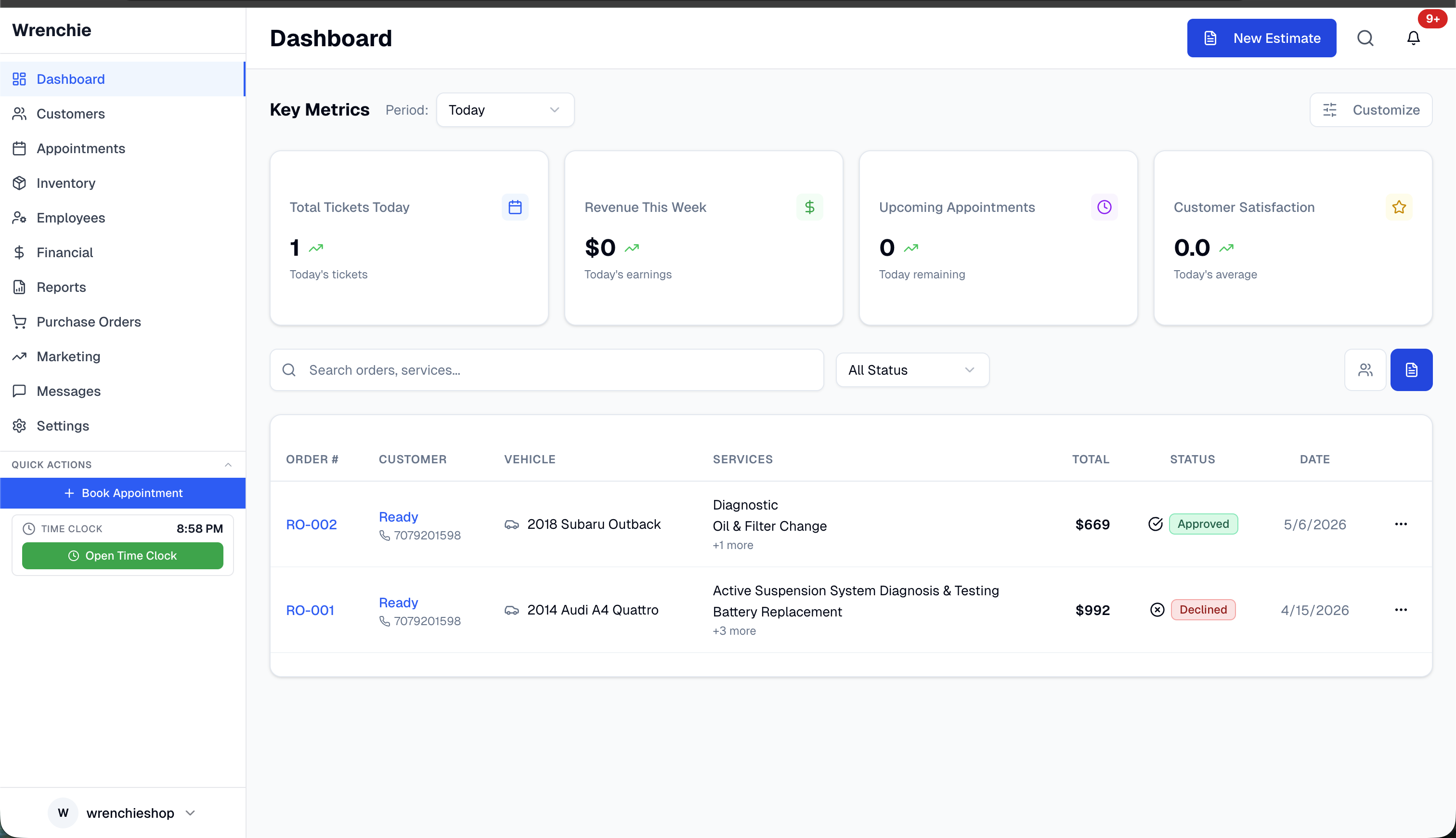
Competitor dashboards with 15+ competing elements vs Wrenchie's focused 4-6 element approach
Desktop dashboard & invoice builder alongside the mobile customer approval experience
Constraints
The product was shaped by real-world limitations: • Budget limitations — No access to PartsTech / WHI integrations • Solo builder reality — Designing and developing while working full-time • User behavior constraints — Technicians avoid desktops and write minimal notes; shops resist long onboarding and complex systems • Operational habits — Shops rely on trusted local parts vendors • Technical limitations — Inconsistent DaaS data during early development These constraints forced a clear principle: Prioritize speed, clarity, and usability over feature completeness.
Options Considered
Option A — Full-Featured CRM Replicate competitors with deep features, reporting, and integrations. Pros: Feature parity, scalability. Cons: High complexity, overwhelming UX, expensive to build. Option B — Parallel Desktop + Mobile Build Simultaneously build technician mobile (DVI inspections) and desktop platform. Pros: Early excitement, strong stakeholder appeal. Cons: Incomplete backend leading to broken workflows, routing inconsistencies, duplicate development effort, high risk of rework. "It would be like releasing a single for an album that hasn't been created yet." Option C — Focused Workflow CRM (Chosen) Design around one core loop: Dashboard → Estimate → Approval → Completion. Pros: Fast, intuitive, aligned with real workflows. Cons: Reduced feature depth, delayed advanced capabilities.
Tradeoffs
Key decisions required explicit sacrifices: • Simplified dashboard → Reduced access to advanced reporting • Limited DaaS visibility → Risk of hiding deeper technical data • No PartsTech / WHI integration → Manual duplicate work for ordering parts • Desktop-first foundation → Delayed efficiency for mobile-first technicians • Delayed mobile development → Reduced early feature excitement Strategy: Optimize for the 80% of daily workflows—not the 20% edge cases.
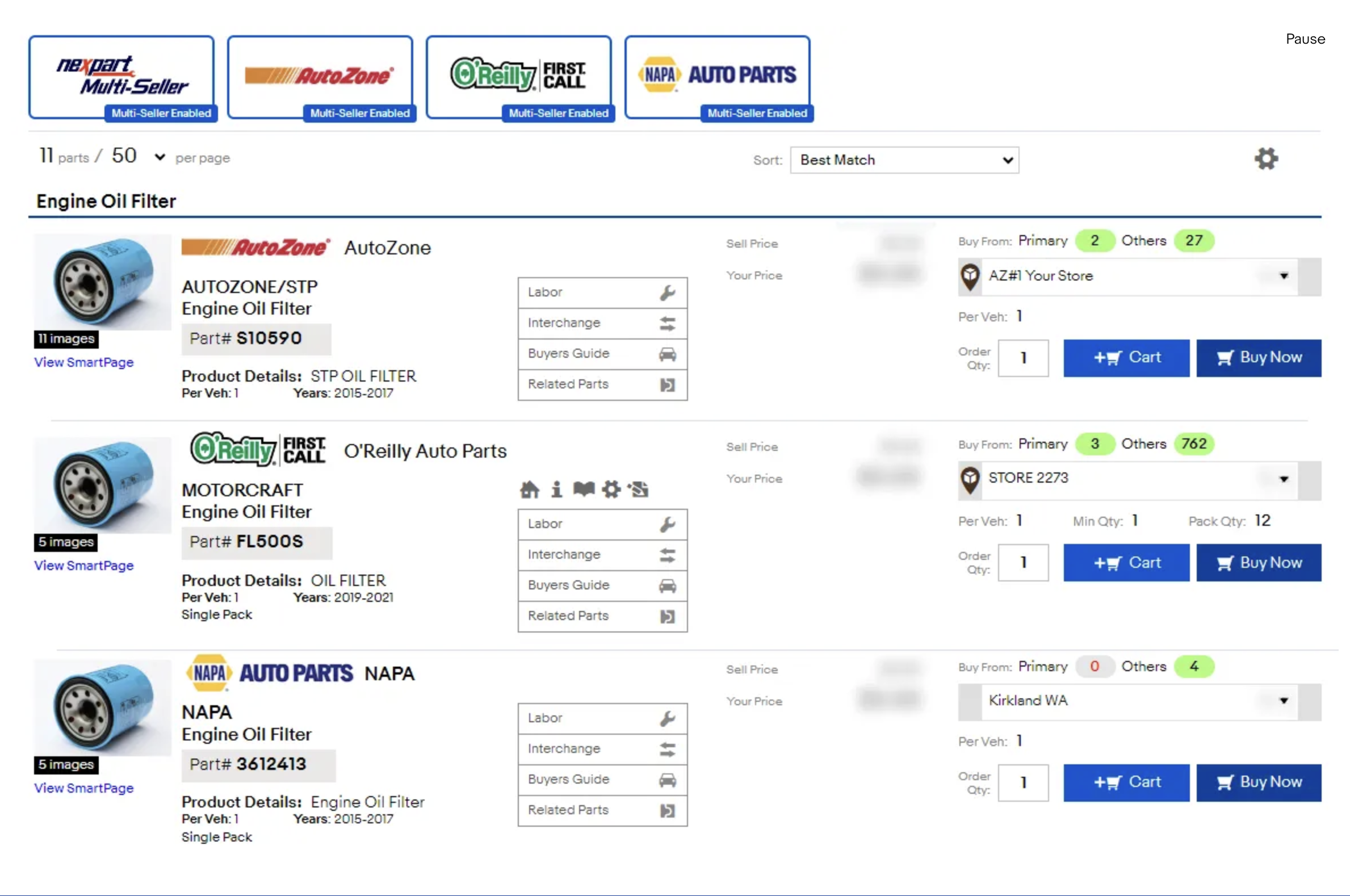
Parts Integration: Nexpart Multi-Seller (AutoZone, O'Reilly, NAPA) vs our manual vendor workflow due to budget constraints
Decision
The product prioritized one primary user first: the Service Writer. Instead of solving for every role at once, the focus became: Completing the repair order lifecycle as quickly and clearly as possible.
Radically simplified dashboard with 4-6 primary elements
Radically Simplified Dashboard
Competitor dashboards surface 15+ elements, creating cognitive overload. Wrenchie reduces this to: • 4–6 primary elements • Top 4 customizable metrics (profit, appointments, pending jobs, etc.) • Active work orders as the default view Users can customize metrics based on daily priorities and click into each metric for deeper insights.
Streamlined Estimate Builder
The most critical workflow—building and sending estimates—was reduced to a 5-step process: 1. Customer + vehicle information 2. Select job types (bundled with PO workflow) 3. Send for approval 4. Continue work / order parts 5. Complete invoice + payment Key improvements included pre-filled DaaS data at surface level, inline editing (no deep navigation), and granular customer approvals (approve/decline specific services).
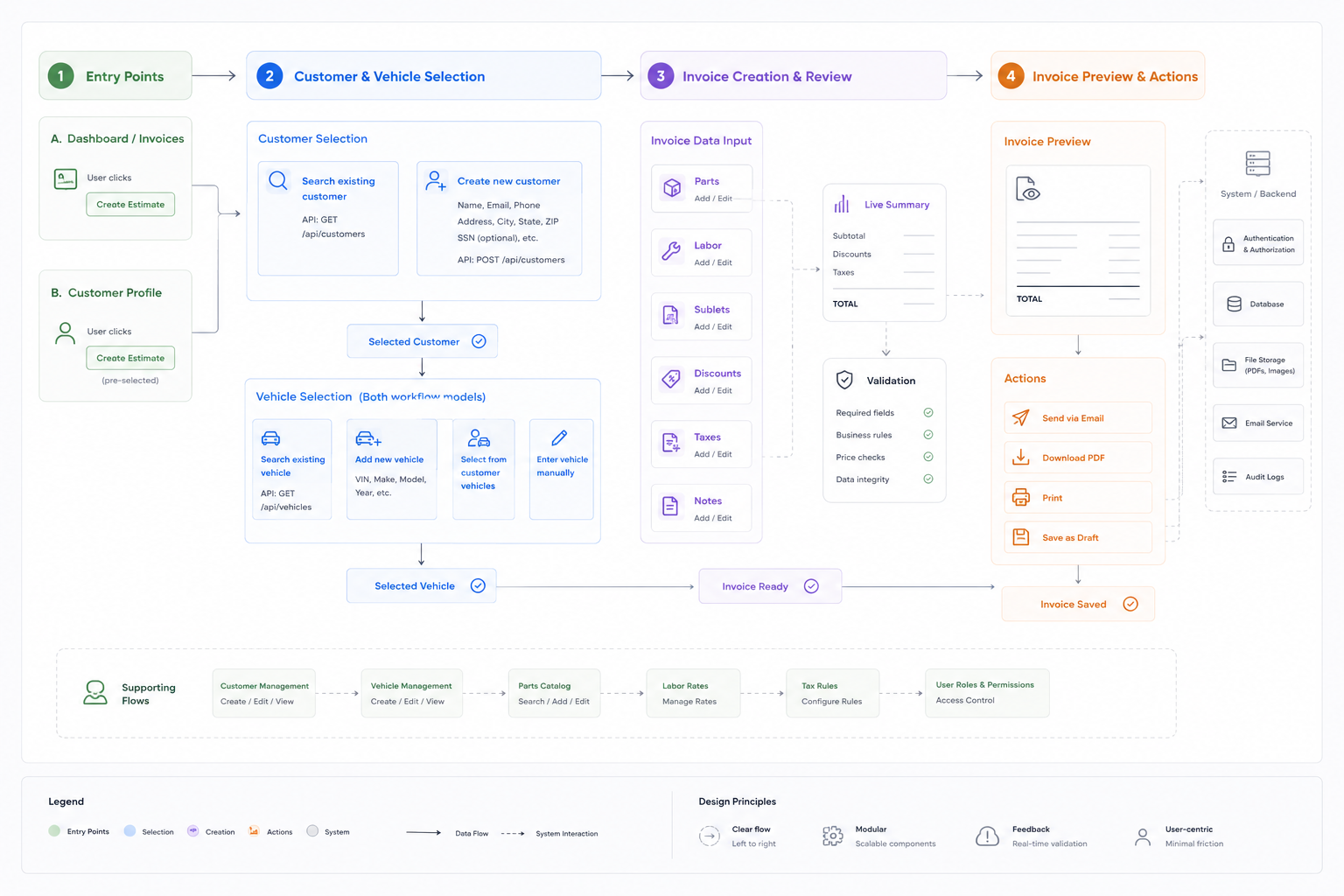
End-to-end flow diagram: Entry Points → Customer & Vehicle Selection → Invoice Creation & Review → Invoice Preview & Actions
Invoice builder workflow: Creating estimates with inline editing, live summary, and validation
High-Frequency Job Templates
Recognizing that most shops rely on repeat services, Wrenchie introduced canned job templates during onboarding: oil changes, tire rotations, battery tests, and diagnostic fees. These allow service writers to instantly reuse predefined job configurations and standardize pricing and workflow. Basic invoices can now be completed in under 5 minutes, eliminating repetitive data entry and improving consistency across jobs. Insight: Optimizing high-frequency tasks delivers the greatest efficiency gains.
Progressive Disclosure of DaaS Data
Initial assumption: More data = better usability. Reality: Most technicians ignored full datasets unless necessary. Solution: Surface only high-frequency, high-value data and provide deeper access through a Service Guide modal. Result: Reduced cognitive load while preserving access to depth when needed.
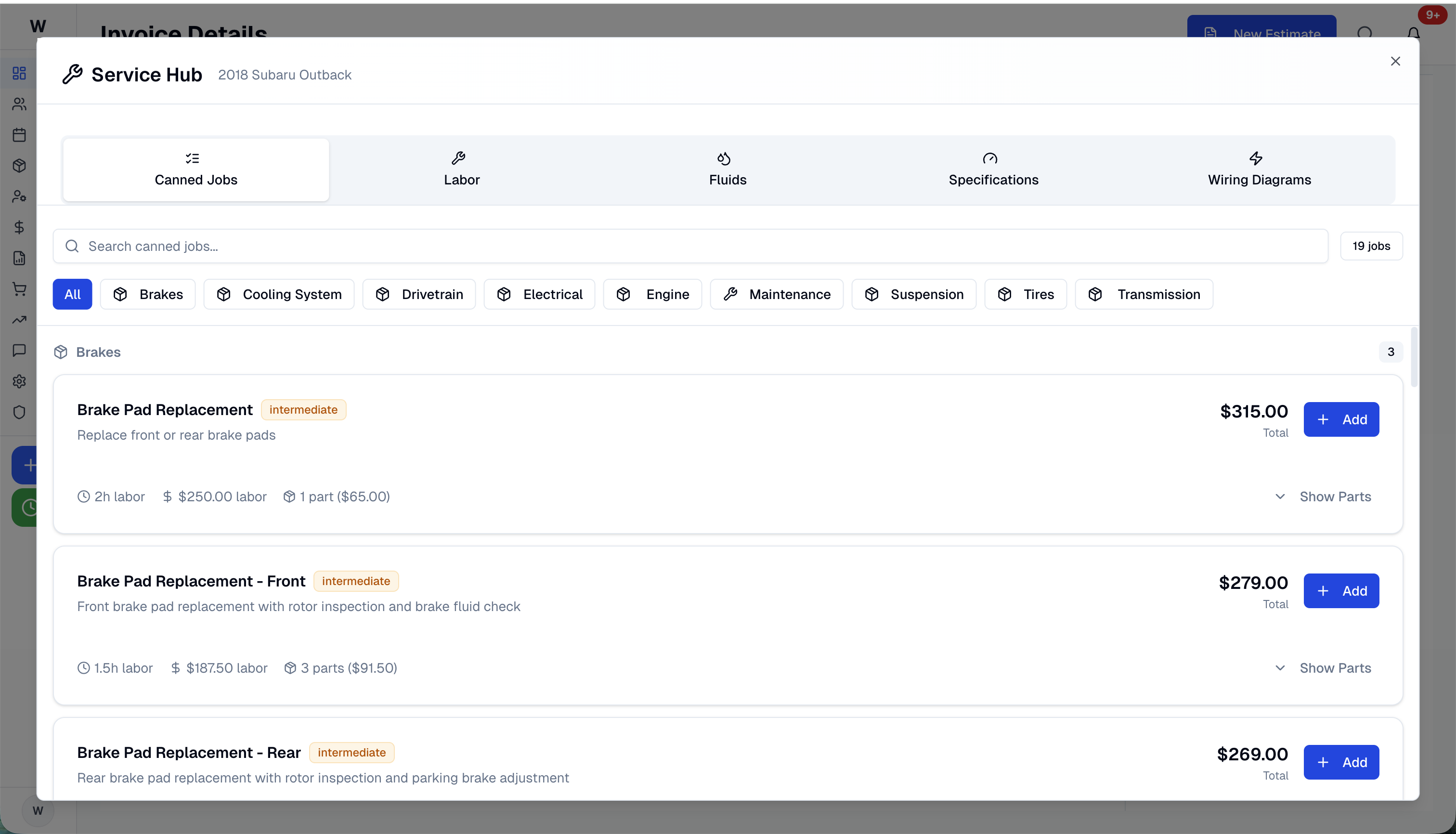
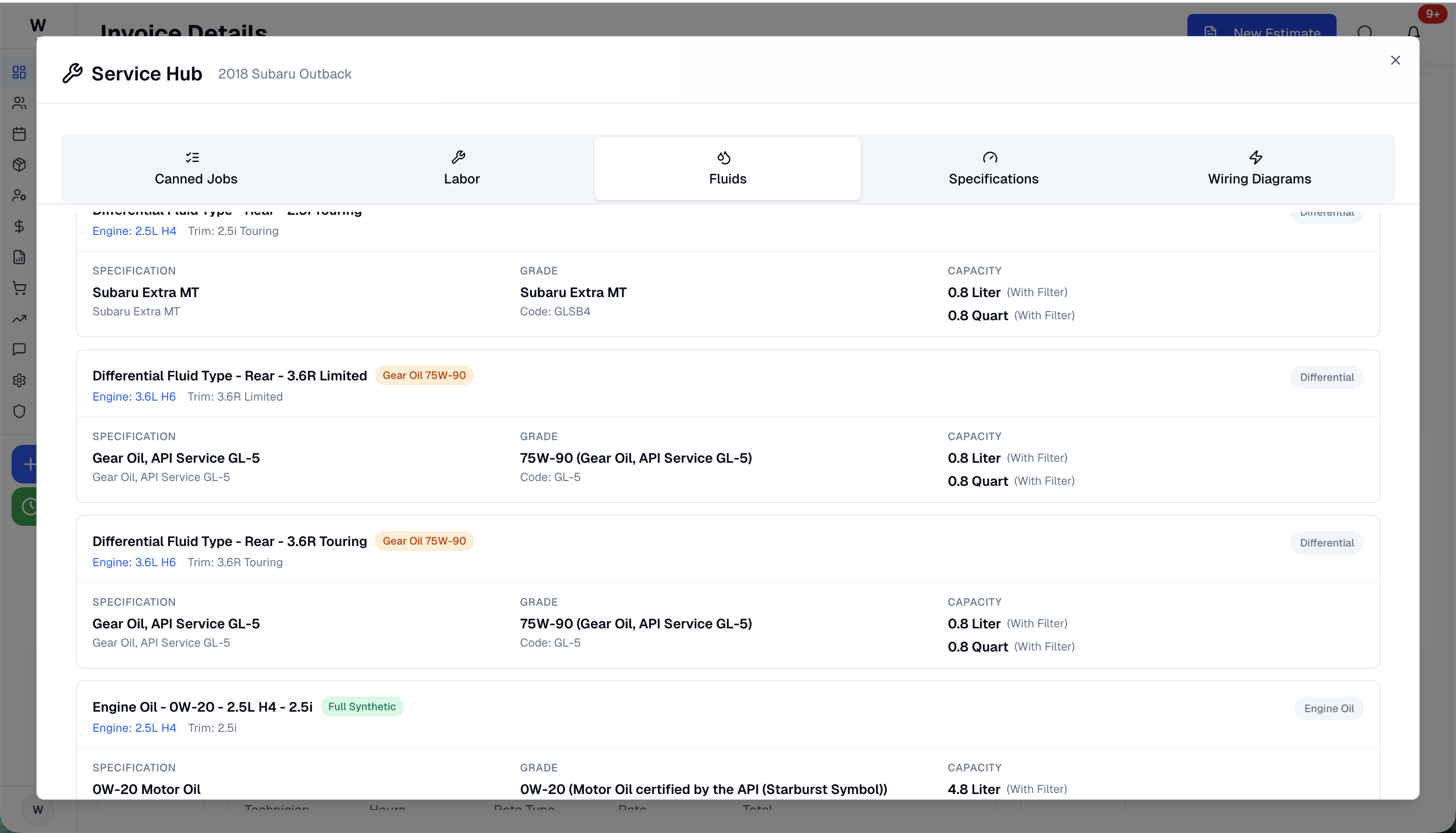
Service Hub: Canned Jobs for quick access, Fluids tab for deep technical specs, all within a tabbed progressive disclosure pattern
What Didn't Work
The first iteration of the Purchase Order (PO) workflow included conflicting mental models: • Two "Assign To" options: "Shop Inventory" vs "Link to RO" — users didn't know which to choose • Vendor selection required pre-configured vendors in Settings, creating a catch-22 for new users • The workflow didn't reflect actual shop practices (jobs flow through repair orders, not POs) Iteration 1 assumptions failed because they prioritized system flexibility over user mental models.
 Before
 After
AfterFirst attempt (confusing mental model with duplicate workflows) vs refined version (RO-centric with clear intent)
Evolution
Initial belief: More features and data would improve usability. What changed: Users ignored most features and felt overwhelmed. Final principle: Clarity over completeness.
Build-in-Public: Evolution from early wireframes through component refinement to the current production UI
“I didn't think it was going to be that easy—great work.”
Results & Impact
Next Project
GD Homes
Rebuilding a Fragmented Brokerage into a Scalable Growth System